

Looking at a modular home battery, adding another module appears about as difficult as stacking another Lego brick. Lift the new battery into place, stack it on top of the others, plug it in and away you go.
How hard can it be? It’s probably why the question pops up every now and then in online owner forums.
One post from a battery owner on an online support forum summed it up perfectly:
“I s’pose it looks fairly straightforward.”
It does, doesn’t it.
Is Adding A Battery Module Really That Simple?
Within a few replies, however, the discussion had grown from “what plugs into what” into DIP switches, battery balancing, BMS settings, communication cables, firmware versions and installer access.
That alone is a clue there might be more to battery expansion than simply stacking another module.
A few months later, another forum member arrived with a similar plan.
“Flush with the joy of ‘free’ electricity, I bought and have now added 3 more… batteries to the system this morning following this post.”
At first, everything appeared to go according to plan. Then his battery management system greeted him with a simple message:
Module Addressing Failed.
That was the beginning of a troubleshooting exercise that would stretch over the next three weeks.
Among his first observations was this:
“I didn’t deplete the existing batteries down to match the SOC of the new ones – mainly cos I didn’t realise that was important before I plugged em in!”
Fair enough. Most people wouldn’t even know what SOC (State of Charge) means.
It turns out battery manufacturers do.
Battery expansion procedures can require the new and existing batteries to be brought to compatible states of charge as part of the expansion process. It’s just one of several behind-the-scenes steps that aren’t obvious from looking at a stack of battery modules.
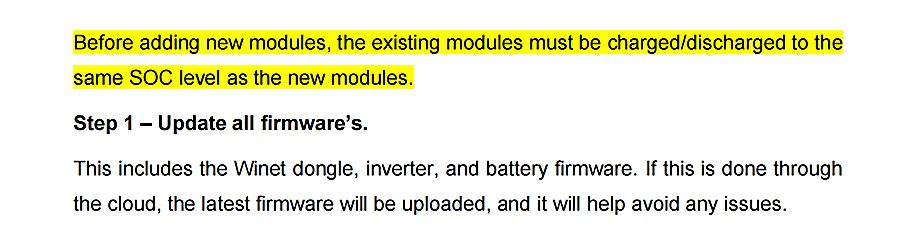
Even before Step 1 begins, Sungrow highlights the need to match the state of charge of the existing and new battery modules in bright yellow in its SBR-SBH HV Battery Series Extension Manual. Image: Sungrow
Unfortunately, matching the batteries’ state of charge wasn’t the end of his problems.
The battery management system wouldn’t stop beeping.
As he understandably put it: “…the beeping is quite annoying…”
Over the following weeks he worked methodically through suggestions from other forum members. He reset the BMS, rearranged battery modules, swapped communication cables, even made replacement CAT5 cables to rule out faulty leads. He posted videos of the startup sequence, hoping someone might spot what he had missed.
Eventually he admitted: “So, I’m a bit stumped now…”
Three weeks after his first post, he finally returned with an update.
“The solution to my problems turned out to be firmware mismatches.”
But even then, the story wasn’t quite over.
According to his follow-up post, he couldn’t simply ring the manufacturer himself. Instead, his installer contacted the company and worked through diagnostics with an engineer over a video call before the required firmware updates were pushed remotely.
What Do Battery Manufacturers Say?
If the forum thread proved anything, it’s that adding another battery module is about much more than physically stacking another box.
The manufacturers’ own documentation tells the same story.
Some don’t just provide an installation manual. They also publish a dedicated battery expansion guide for adding extra modules to an existing system.
Depending on the system, the process may include bringing the existing and new batteries to compatible states of charge, checking or updating firmware, recommissioning the battery system and confirming communications before the expanded system is returned to service.
The manuals also make something else clear. This isn’t treated like assembling flat-pack furniture.
They include isolation procedures, specify personal protective equipment and contain repeated warnings about high voltage and electric shock for people carrying out the work.
Then there’s the warranty.
Sungrow’s Australian warranty also addresses battery expansions. It requires additional modules to be installed in accordance with the company’s battery expansion procedures and excludes damage resulting from faulty installation or commissioning, failing to follow installation instructions and unauthorised alterations.
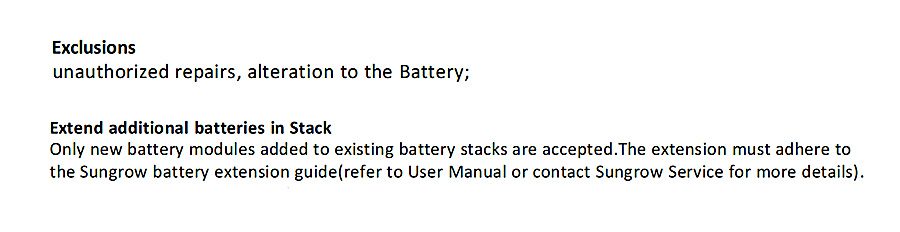
Battery expansion procedures don’t just help systems work properly. They can also help protect your warranty. Image: Sungrow
By this stage, it’s not difficult to understand why battery manufacturers expect expansion work to be carried out—and, when something goes wrong, supported—through trained installers.
Even If You Can DIY It, Should You?
For almost everyone, the answer is a simple “no”. Not because adding another battery module is physically difficult. Because that’s only a small part of the job.
As the forum thread showed, what starts out looking like a straightforward Saturday project can quickly disappear down a rabbit hole with no obvious end.
Unlike Lego, this is one project that’s best left to the professionals.
If you’re thinking about expanding your home battery, first read about SolarQuotes founder Finn Peacock’s experience adding an extra module to his own Sungrow battery, then check out our Understanding Home Batteries guide before deciding what’s right for your system.
By the way, if you’re looking for instructions on assembling Lego, you’ll find them here.
 About Kim Wainwright
 RSS - Posts






It isn’t always difficult! We doubled the size of our Sigenergy stack and it was all over in a couple of hours. Software was updated online almost instantly, no problems with SOC levels.
The only issue we had was cable length – with the inverter lifted several modules higher, we had some re-work on conduit and terminations to get the solar and ACpower cables to reach the new position. Installers might think about this when running wires in for the original install – if they come down the wall vertically to the battery stack then it’s easy to shorten them.
I think the biggest potential problem for add-on battery modules would be an installation where the solar or ACpower cables run vertically up the wall to the inverter on top of the- adding batteries in that situation would require cable extensions or replacements.
Fun Fact:
If you install additional battery modules later to increase the capacity of an existing Sungrow battery stack, the new modules do not receive a fresh 10-year warranty.
Instead, the warranty and performance warranty for the entire expanded stack continue from:
the original battery system installation date, or
the manufacturing date of the oldest battery module.
Practical example:
Initial battery system: 1 July 2023
Add two extra modules: 1 July 2026
The added modules do NOT get warranty until 2036.
Instead, they inherit the warranty timeline of the original stack, so the expanded stack’s warranty still expires around 1 July 2033.
Exception: If you install a new battery stack in parallel, Sungrow treats it as a new battery with its own new warranty.
In comparison, battery modules such as iStore & SigEnergy with built-in Optimisers prevent older modules negatively impacting new modules added later. New modules come with full warranty.
If the battery expansion is left too long, the manufacturer may have changed battery cell make-up in new production, such that inclusion in an old battery stack is not possible. So long procrastination doesn’t always pay here.
Granted, Sigenergy and other battery modules with integral DC/DC converters avoid that problem entirely, by masking the internal module voltage from the system. That is real modularity.
Sounds very DIY to me. Installer ? Yeah right. His mate Jack. A plasterer who started his electrical apprenticeship long ago.
Then updating the regulator… Its more paperwork and a site drawing and probably more of the dumb stickers
I added a second PW3, or rather the original sq recommended installer did, and everything ran smoothly.
I was surprised about the need to match soc, but the software just handled it without any fuss after connection.
Also I didn’t expect that the original one had to be removed and reinstalled in front of the new module, but all done in a couple of hours.
With electricians stretched thin, this feels like the perfect moment to rethink the design so future capacity can be added without drama. It really shouldn’t be difficult to engineer something that’s modular, scalable, and easy to expand.
My installer added another module to my Sigenergy battery without any dramas at all. Worked perfectly on the day & since. Went from 16 to 24.
I would have thought any major electrical work needs to be done by a qualified electrician. Any electrical issues resulting from the installation of any electrical equipment can result is voiding your warranty and insurances.
Does adding modules to a stack that’s already a few years old take into account battery wear levels?
Hi Mike,
Depends on the battery. Some like Sungrow are connected in series and the BMS will manage the stack to perform like the weakest link. So new batteries will perform like the oldest ones in the stack, which prevents old batteries being strained trying to perform like new ones.
Others like Sig and GoodWe run batteries in parallel with internal DC-DC chargers for each block, so they perform independently. 48V nominal like Victron & Selectronic systems run in parallel too.